VxWorks and Tornado: A Practical Guide to Classic RTOS Development

VxWorks is a high-performance real-time operating system (RTOS) developed by Wind River for embedded systems where predictable timing, reliability, and hardware control are critical. It has been widely deployed in aerospace, defense, telecommunications, automotive systems, industrial control, and other demanding environments.
First introduced in 1983, VxWorks was designed around deterministic execution, modularity, and a comprehensive development environment. Its classic Tornado integrated development environment (IDE) provides a host-side toolchain for building, downloading, debugging, and analyzing applications running on VxWorks targets.
This article introduces the architecture and development workflow of classic VxWorks and Tornado, with particular emphasis on Tornado 2.2. It covers bootable and downloadable projects, multitasking, inter-task communication, device drivers, networking, interrupts, timers, and the tools used to diagnose real-time behavior.
🏗️ VxWorks and Wind River Fundamentals #
Wind River provides embedded software platforms, development tools, and services for systems that require reliable and predictable operation.
VxWorks is a preemptive real-time multitasking operating system. Applications are divided into independent tasks, each representing a separate execution context. The kernel schedules these tasks according to priority and provides synchronization, communication, timing, memory management, and interrupt facilities.
A typical VxWorks system combines several layers:
Application Tasks
       │
       ├── Networking
       ├── File Systems
       ├── Device Drivers
       └── Application Libraries
       │
       ▼
VxWorks Kernel
       │
       ├── Task Scheduler
       ├── Semaphores
       ├── Message Queues
       ├── Timers
       ├── Memory Management
       └── Interrupt Handling
       │
       ▼
Board Support Package (BSP)
       │
       ▼
Target Hardware
This structure allows developers to build a system around the exact capabilities required by the application.
Core VxWorks Components #
The operating system is highly modular, with hundreds of relatively independent object modules. Developers can select the components required by a particular target, reducing unnecessary footprint while improving maintainability.
Important components include:
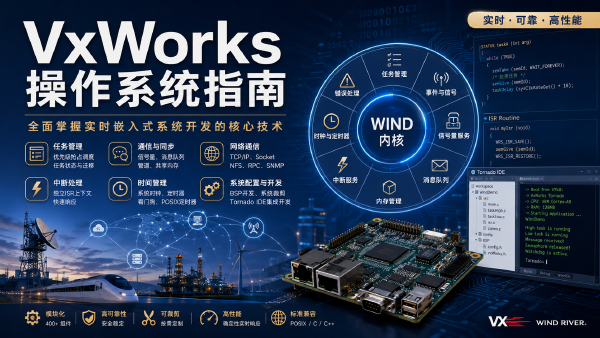
- Wind kernel – provides priority-based task scheduling, synchronization, communication, interrupts, timers, and memory management.
- POSIX real-time support – provides compatibility with the POSIX P1003.1b real-time standard.
- I/O system – supports ANSI C-style I/O, UNIX buffered I/O, POSIX asynchronous I/O, and device-specific drivers.
- File systems – includes support for MS-DOS, RT-11, RAM, and SCSI-based storage.
- Networking stack – supports TCP/IP, UDP, NFS, SNMP, FTP, remote file access, and remote procedure mechanisms.
- VxVMI – optional virtual-memory support for systems requiring additional memory-management capabilities.
- VxMP – optional multiprocessor and shared-memory facilities.
- Board Support Packages (BSPs) – provide the hardware-specific initialization and low-level support required to boot VxWorks.
- Target tools and libraries – provide runtime utilities, C/C++ support, diagnostics, and development infrastructure.
- VxSim – provides a simulated VxWorks target for development without physical hardware.
Tasks and Inter-Task Communication #
VxWorks applications commonly divide functionality into multiple tasks rather than placing all processing inside a single execution thread.
The kernel provides several mechanisms for coordinating these tasks:
- Binary semaphores
- Counting semaphores
- Mutual-exclusion semaphores
- Message queues
- Pipes
- Signals
- Network-transparent communication mechanisms
Hardware events are handled through interrupt service routines (ISRs), which execute in an interrupt context and can interact with kernel mechanisms to trigger subsequent task-level processing.
This separation between interrupt-level handling and task-level processing is particularly important in real-time systems, where interrupt latency and predictable scheduling directly influence system behavior.
🛠️ The Tornado Integrated Development Environment #
Tornado provides the classic host-based development environment for VxWorks.
Unlike a conventional desktop IDE, Tornado is designed around a host-target development model. The host computer provides the compiler, debugger, project management, visualization, and scripting tools, while the VxWorks kernel and application execute on the target.
The target can be a physical embedded board or a simulated system running under VxSim.
Tornado supports several host-target communication mechanisms, including:
- Ethernet
- Serial connections
- In-circuit emulators
- ROM emulators
Major Tornado Tools #
| Tool | Primary Function |
|---|---|
| Project Manager | Creates, configures, and builds VxWorks projects |
| Editor | Provides source editing, syntax highlighting, and code tracking |
| GNU Toolchain | Provides preprocessing, compilation, linking, and build utilities |
| Browser | Displays target system state and kernel objects |
| CrossWind | Provides source-level debugging based on GDB |
| WindSh | Provides an interactive C-language target shell |
| VxSim | Simulates a VxWorks target without physical hardware |
| WindView | Visualizes task scheduling, interrupts, and system events |
The tools complement one another rather than operating as isolated utilities.
For example, an engineer can use WindSh to launch a task, Browser to inspect its state, CrossWind to debug its source code, and WindView to understand its timing behavior.
Browser #
The Tornado Browser provides a graphical view of the running VxWorks system.
Depending on the configured components, developers can inspect:
- Tasks
- Semaphores
- Message queues
- Memory blocks
- Watchdog timers
- System state
The information can be refreshed on demand or periodically, making the Browser useful for monitoring a live target during development.
CrossWind #
CrossWind is Tornado’s source-level debugging environment, based on GDB.
It supports common debugging operations such as:
- Breakpoints
- Task-specific debugging
- System-level breakpoints
- Single-stepping
- Disassembly
- Mixed source and assembly views
- Runtime inspection
This allows developers to move from a high-level source statement to the corresponding machine-level instructions when investigating low-level behavior.
WindSh #
WindSh is the VxWorks shell.
One of its defining characteristics is the ability to evaluate C expressions and interact directly with the running target. Developers can use it to:
- Invoke functions
- Start and stop tasks
- Inspect memory
- Examine symbols
- Display system information
- Download or manipulate modules
- Investigate runtime behavior
For embedded development, this interactive target shell can significantly shorten the edit-build-download-test cycle.
WindView #
WindView works more like a graphical logic analyzer for software execution.
Instead of simply showing the current state, it records and visualizes system activity over time. Developers can examine:
- Task switches
- Interrupts
- Semaphore operations
- Message activity
- Scheduling behavior
- Timing relationships
This makes WindView particularly useful when an application appears functionally correct but violates real-time expectations.
🧪 Starting Development with VxSim #
For developers learning VxWorks, VxSim provides a convenient starting point because physical target hardware is not required.
A typical workflow looks like this:
Create Project
     │
     ▼
Write Application
     │
     ▼
Build Downloadable Module
     │
     ▼
Start VxSim
     │
     ▼
Start Target Server
     │
     ▼
Download Module
     │
     ▼
Run Application from WindSh
     │
     ├──> Inspect with Browser
     ├──> Debug with CrossWind
     └──> Analyze timing with WindView
A useful introductory application is a simulated data-acquisition system containing several cooperating tasks, such as:
Producer
   │
   ▼
Collector
   │
   ▼
Processor
   │
   ▼
Monitor
Each task can have a different priority and synchronization requirement.
Changing priorities or deliberately introducing synchronization problems can then be used to study scheduling, priority inversion, resource contention, and other real-time issues.
💾 Building Bootable VxWorks Projects #
VxWorks development generally involves two broad project categories: bootable projects and downloadable projects.
A bootable project produces a complete VxWorks system image that can be loaded onto target hardware.
BSP Integration #
The Board Support Package (BSP) provides the hardware-specific code required to initialize a board and start the operating system.
After installing a BSP into the Tornado configuration environment, developers can create a project that selects:
- Target BSP
- GNU toolchain
- Kernel configuration
- Networking components
- File systems
- Debugging facilities
- Application components
The BSP typically contains low-level initialization and hardware abstraction code such as:
romInit.sromStart.csysALib.ssysLib.c
These components handle activities such as ROM initialization, relocation, RAM startup, hardware initialization, interrupt configuration, and memory mapping.
Configuring the VxWorks Image #
Tornado allows developers to select or remove components graphically.
For example, a target might include:
VxWorks Kernel
├── Network Support
├── WDB Connection
├── File System
├── Device Drivers
├── Application Code
└── Debugging Support
Removing components that are not required can reduce the resulting image size and simplify the target configuration.
Build configurations can produce different image forms, including compressed and uncompressed ROM images, ROM-resident images, and standalone images.
The completed image can then be transferred to the target through an appropriate hardware or bootloader mechanism and started on the board.
📦 Building Downloadable Projects #
A downloadable project takes a different approach.
Instead of rebuilding the entire operating system, developers compile application code into a relocatable module that can be loaded into an already-running VxWorks system.
A simple example is a classic Hello World module:
#include <vxWorks.h>
#include <ioLib.h>

int hello(void)
{
    int fd = open("/tyCo/0", O_WRONLY, 0);

    if (fd >= 0)
    {
        write(fd, "Hello, World!\n", 14);
        close(fd);
    }

    return 0;
}
The workflow is:
Source Code
    │
    ▼
Compile and Link
    │
    ▼
Relocatable Module
    │
    ▼
Target Server
    │
    ▼
Download to VxWorks
    │
    ▼
Invoke Entry Function from WindSh
This model is especially convenient during development because application changes can be tested without rebuilding and reflashing the entire VxWorks image.
🔌 Serial I/O and Device Access #
Serial communication is one of the simplest ways to demonstrate VxWorks I/O.
Typical operations include:
openclosereadwriteioctl
A serial application can open a device such as /tyCo/0, configure its parameters, read incoming data, and write output.
The same general I/O model extends to many other device classes, although the actual device names and capabilities depend on the BSP and installed drivers.
📁 File Systems and RAM Disks #
VxWorks supports several file-system implementations, allowing embedded applications to work with persistent or temporary storage.
A RAM disk, for example, provides filesystem-like access to memory without requiring physical storage hardware.
The RAM disk driver, commonly exposed through ramDrv, can be useful for:
- Temporary application data
- Test files
- Simulated storage
- Development environments
- Systems without persistent storage
The exact filesystem and driver configuration remains target-dependent and must be supported by the selected VxWorks image and BSP.
🌐 Networking with VxWorks #
Networking is another major VxWorks capability.
Applications can use BSD-style sockets for both connection-oriented and connectionless communication.
TCP #
A typical TCP server follows this sequence:
socket()
   │
   ▼
bind()
   │
   ▼
listen()
   │
   ▼
accept()
   │
   ▼
send() / recv()
A TCP client generally uses:
socket()
   │
   ▼
connect()
   │
   ▼
send() / recv()
UDP #
UDP applications use datagram operations:
socket()
   │
   ├──> bind()
   │
   └──> sendto() / recvfrom()
VxWorks networking capabilities also support services such as:
- Ping
- FTP
- NFS
- SNMP
- Remote file access
- Ethernet packet processing and capture
This allows an embedded target to operate as anything from a simple network endpoint to a complex distributed control node.
🔄 Multitasking and Synchronization #
Real-time applications frequently divide processing into multiple tasks.
For example:
Sensor Task
     │
     ▼
Acquisition Queue
     │
     ▼
Processing Task
     │
     ▼
Output Task
     │
     ▼
Monitoring Task
The kernel’s synchronization primitives coordinate access to shared resources and transfer data between tasks.
Semaphores #
VxWorks provides several semaphore types:
- Binary semaphores – useful for event synchronization.
- Counting semaphores – useful when multiple resources or events must be tracked.
- Mutual-exclusion semaphores – protect shared resources and provide ownership semantics.
Correct synchronization is essential because concurrency introduces problems such as:
- Race conditions
- Deadlocks
- Priority inversion
- Resource contention
WindView and the Browser provide valuable visibility into these interactions.
Message Queues and Pipes #
Message queues provide structured communication between tasks.
Pipes offer another IPC mechanism, particularly useful when applications benefit from file-like communication semantics.
These mechanisms allow tasks to remain relatively independent while exchanging data through well-defined synchronization points.
⚡ Interrupts and Timers #
Hardware interrupts allow VxWorks to react quickly to external events.
A typical interrupt-driven design separates immediate interrupt handling from more substantial processing:
Hardware Event
      │
      ▼
Interrupt Service Routine
      │
      ▼
Signal / Semaphore / Queue
      │
      ▼
Worker Task
      │
      ▼
Application Processing
The ISR should generally perform only the work necessary to acknowledge the event and transfer processing into an appropriate task context.
VxWorks also provides watchdog timer facilities for scheduling time-based events and detecting or responding to timing conditions.
Combining interrupts with timers and task synchronization enables developers to construct deterministic control loops and event-driven applications.
🎨 Graphics Drivers with WindML #
For systems requiring graphical output, VxWorks provides WindML support for graphics and multimedia-related functionality.
Developing a graphics driver can involve:
- Installing the required WindML components
- Modifying the BSP
- Configuring LCD parameters
- Creating or adapting device drivers
- Integrating board-specific hardware support
Boards such as the UPTECH2410 can be used to demonstrate this process.
Sample applications such as wexbasic and ugldemo provide useful reference points for understanding how the graphics stack interacts with target hardware.
Because graphics support is strongly dependent on the BSP and hardware configuration, driver development typically requires both software and board-level knowledge.
🔍 A Disciplined VxWorks Development Workflow #
The strength of the classic VxWorks/Tornado environment is not simply the number of tools it provides. It is the way those tools fit into a repeatable development loop.
A practical workflow is:
1. Configure the target
       │
       ▼
2. Start with VxSim or a BSP
       │
       ▼
3. Build a minimal VxWorks image
       │
       ▼
4. Develop application modules
       │
       ▼
5. Download and execute
       │
       ▼
6. Inspect with WindSh / Browser
       │
       ▼
7. Debug with CrossWind
       │
       ▼
8. Analyze timing with WindView
       │
       ▼
9. Integrate drivers and hardware
       │
       ▼
10. Validate real-time behavior
This incremental approach reduces the number of variables introduced at each stage.
Instead of attempting to debug the complete embedded system immediately, developers can first establish a functioning kernel, verify basic I/O, introduce individual tasks, add synchronization, integrate networking and drivers, and finally validate timing under realistic workloads.
🧠 Why VxWorks and Tornado Remain Technically Important #
Classic VxWorks deployments illustrate several principles that remain relevant to modern embedded engineering.
First, determinism is an architectural property. Real-time performance cannot be achieved simply by increasing processor speed. Scheduling policy, interrupt latency, synchronization, memory behavior, and application architecture all influence whether deadlines can be met.
Second, modularity matters. A system composed of configurable kernel, driver, networking, filesystem, and application components can be adapted to widely different hardware and resource constraints.
Third, observability is part of development. Tools such as Browser and WindView are valuable because real-time problems are often difficult to identify from source code alone. Engineers need to observe what the system actually did, when it happened, and which tasks or resources were involved.
Finally, host-target development remains a powerful model for embedded systems. Separating the development environment from the constrained target allows engineers to use sophisticated compilation, debugging, visualization, and scripting tools while maintaining a lightweight runtime system.
🏁 Conclusion #
VxWorks combined with Tornado provides a mature development model for building reliable, deterministic embedded systems.
Its architecture combines a real-time kernel, priority-based multitasking, synchronization primitives, interrupt handling, networking, filesystems, device drivers, and optional system components. Tornado complements that runtime environment with a complete host-side toolchain for building, downloading, debugging, and analyzing applications.
The distinction between bootable projects and downloadable modules provides flexibility during development. VxSim allows applications to be tested before hardware is available, while BSPs provide the bridge from a generic VxWorks environment to a specific embedded board.
Tools such as WindSh, Browser, CrossWind, and WindView complete the workflow by providing direct access to the running system, source-level debugging, system-state inspection, and temporal analysis of real-time behavior.
For engineers working with classic VxWorks deployments, the fundamental workflow remains straightforward:
Configure → Build → Download → Run → Observe → Debug → OptimizeWhether the target is a minimal bootable image, a networked multitasking application, a device driver, or a graphics-enabled embedded system, disciplined incremental development is the key to turning VxWorks’ modular architecture and real-time capabilities into a dependable production system.